
Virtual Pet is an Augmented Reality app built using Unity and the Meta
XR SDK. Using a Meta Quest Headset, players can use their hands to
interact and play with a virtual pet. The pet will react to the player's
actions and can be fed, played fetch with, and petted.
The project was made in a team of 5 over 3 months and as a programmer, it was my role was to implement the pet's state machine and ensure it reacted to the player's actions.
The project was inspired by the work of another virtual pet game:
Peridot. Our team aimed to produce a similar experience and ensure that
the interactions felt natural and a part of the world.
> User Journey_
To create a natural feel, the user journey is very open. The player can
interact with the pet in any way they choose. They can pet the Dragon,

pick up a ball that is spawned in the area around them or pick up some
food that will be spawned on a flat surface.
Depending on the state of the pet it will then react to the player's
action. The dragon begins by randomly wandering around the room but will
quickly move to the player when they pick up the ball or food.
From here, the pet will follow the player until they release the item
they are holding. The pet will grow impatient if the player holds the
item for too long and will begin to roar and jump up and down.
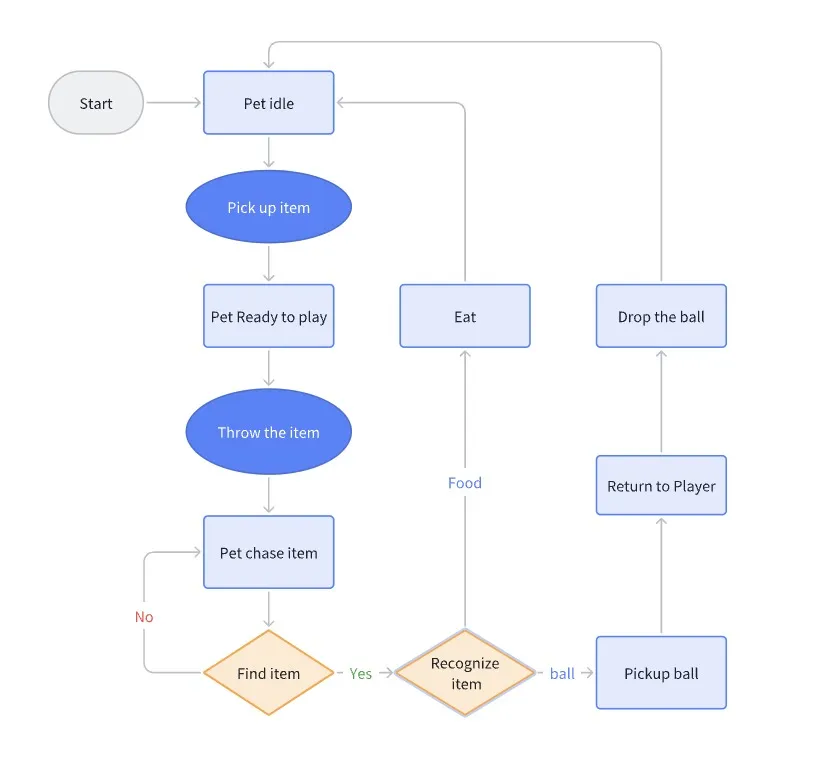

When the player releases the item, the pet will navigate to it and then
either eat the food, or pick up the ball and return it to the player.
The pet will then return to wandering around and the player can once
again make an action.
> Technical Overview_
State Machine:
The pet's state machine was implemented using an enum based system. The
PetAI class stores its current state which can then be updated by the
player's actions.
public enum Behaviour{ Idle, ReadyToPlay, GoPickup, ReturnPickup, OnPatting, Eating,}
The state machine is then updated in the Update function of the PetAI
class. This function checks the current state and then updates the
behaviour of the pet accordingly.
private void Update(){ switch (_currentBehaviour) { case Behaviour.Idle: Idle(); break; case Behaviour.ReadyToPlay: ReadyToPlay(); break; case Behaviour.GoPickup: GoPickup(); break; case Behaviour.ReturnPickup: ReturnPickup(); break; } LookAtVerticalTarget(); if (!_agent.updateRotation) LookAtHorizontalTarget();}
An example of a state change is when the player picks up the ball. The
player script tells the petAI that the ball has been picked up and the
petAI then changes its state to "ReadyToPlay".
if (_handGrabInteractorLeft.IsGrabbing || _handGrabInteractorRight.IsGrabbing){ // check if item is in left hand _grabbedObject = _handGrabInteractorLeft.SelectedInteractable != null ? _handGrabInteractorLeft.SelectedInteractable.transform.gameObject : null; // if not in left hand, it must be in right if (_grabbedObject == null) _grabbedObject = _handGrabInteractorRight.SelectedInteractable.transform.gameObject; // detach object from pet if pet is holding it _grabbedObject.transform.parent.SetParent(null); _wasGrabbingLastFrame = true; // tell pet that player picked up the ball _pet.OnBallPickedUpByPlayer();}
Pet method to change to ReadyToPlay state.
public void OnBallPickedUpByPlayer(){ if (_currentBehaviour == Behaviour.ReadyToPlay || _currentBehaviour == Behaviour.Eating) return; // navmesh agent no longer needs to update rotation // as the pet will be looking at the player _agent.updateRotation = false; // pet drops anything it's holding DropPickup(); _currentBehaviour = Behaviour.ReadyToPlay;}
Simple guard checks were put in place to ensure state changes could only
occur at certain times. These "On X has happened" methods also acted as
the enter and exit functions for states. During these methods, calls to
navigation agent behaviour and animations were made.
The pet's ability to grab items was implemented using a spherecast from
in front of the pet's mouth. If the spherecast hit an item, a time
starts and the pet will wait some time before picking up the item. This
was done to ensure the pet didn't pick an item up the same frame it was
seen as it looked unnatural.
public static class State_GoPickup{ public static float RecalcToTargetTime = 0.1f; public static float RecalcToTargetTimer = 0f; public static float stoppingDistanceToPickup = 0.35f; public static float minDistanceToScan = 0.2f; public static float PickupRadius = 0.25f; public static float PickupRange = 0.5f; public static bool IsPickingUp = false; // Timer values to wait before picking up a found item public static float WaitBeforePickupTime = 0.5f; public static float WaitBeforePickupTimer = 0f;}
Sometimes the ball would be located underneath the pet and the
spherecast check would fail. To counter this I also used an
OverlapSphere check to see if the ball was within a certain distance of
the pet's body.
private void ScanForPickup(){ if (State_GoPickup.IsPickingUp) return; Array.Clear(_scanResults, 0, _scanResults.Length); // check for pickups underneath pet if (Physics.OverlapSphereNonAlloc(transform.position, State_GoPickup.PickupRadius, _scanResults, _pickupLayer) > 0) { foreach (Collider col in _scanResults) { if (col == null) continue; if (col.transform.parent.parent.TryGetComponent(out Pickup pickup)) { PreparePickup(pickup); break; } } } // check for pickups in front of pet else if (Physics.SphereCast(transform.position, State_GoPickup.PickupRadius, transform.forward, out RaycastHit hit, State_GoPickup.PickupRange, _pickupLayer)) { if (hit.transform.TryGetComponent(out Pickup pickup)) { PreparePickup(pickup); } } else { State_GoPickup.WaitBeforePickupTimer = 0f; }}
While the pet is in this state, the scan is run every frame, and will
only pickup the item if enough time has passed while said item is in
view.
I believe the project effectively merged the AR interactions with the
real world environment, as the pet moves around the play area avoiding
obstacles and picking up items. By implementing a simple state machine
it allowed our team to come up with different pet behaviours that could
be quickly prototyped and implemented.
The team's use of animations & sounds combined with the behavior
scripting helped bring the pet to life. Small details, like waiting a
moment before picking up an item, looking at the player when holding an
item and getting impatient when the player takes too long, added a real
feel to the virtual pet. These design choices meant that the pet
responded organically to the player's actions. Looking ahead, more
interactions could be added to further engage users, using additional
sound effects and polishing movement transitions. Allowing the player to
physically move the pet with their hands would really sell the feel of
the pet. By expanding these areas, the AR experience can achieve an even
greater sense of authenticity for players.